Bringing Your Brand to Life with a Pen with Cap 3D Mockup Template Bundle
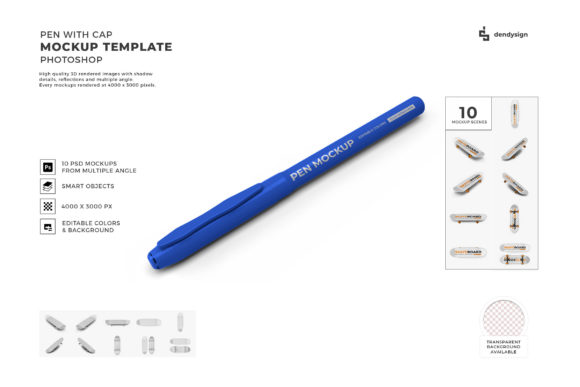
If you’ve ever tried to photograph a pen for a product listing, a social media post, or a client presentation, you know it’s a surprisingly tricky subject. The glossy finish catches every stray reflection, the cap never sits perfectly straight, and getting that dynamic “open cap” shot requires careful alignment and often multiple attempts. That’s exactly where a Pen with Cap 3D Mockup Template Bundle steps in. These aren’t just static images—they’re layered, editable files that let you insert your own artwork, logo, or pattern onto the pen barrel, the cap, or both, and then render a photorealistic result in minutes.
Real-World Scenarios for Pen Mockups
The beauty of a template bundle lies in its flexibility. Instead of staging a physical photoshoot for every new design, you can create dozens of unique presentations from one set of files. Here are some everyday situations where a pen mockup bundle becomes indispensable.
E-commerce product pages for independent stationery brands
Running a small shop that sells custom-printed pens? You probably have a dozen colorways and several cap styles. Photographing each combination with consistent lighting and background is a logistical headache. With a 3D mockup bundle, you simply swap the artwork on the pen body and cap in your design software. The same template can show a metallic barrel with a matte cap, or a translucent pen with a solid cap. Your product page ends up looking cohesive, professional, and ready to convert browsers into buyers.
Corporate gift catalogs and client proposals
Marketing teams ordering branded pens for trade shows or client gifts often need to preview how a logo will look on different pen finishes. Instead of asking for a physical sample for every option, you can use the bundle to generate a realistic mockup of a glossy black pen with a white cap, place it in a simple lifestyle scene, and share it within the proposal. The client sees exactly what’s being ordered, reducing back-and-forth and last-minute surprises.
Social media teasers for limited-edition releases
When a brand launches a special edition pen—maybe a collaboration with an artist or a seasonal color drop—the marketing needs to feel exclusive. A Pen with Cap 3D Mockup Template Bundle allows you to create multiple angles (pen lying flat, pen uncapped, pen tilted) without reshooting. You can isolate the pen on a solid background for clean product shots, or layer it onto a desk scene mockup for lifestyle posts. One bundle, several distinct looks, all on-brand.
Portfolio pieces for freelance graphic designers
If you’re a designer who wants to show you can handle packaging and product mockups, having a realistic pen presentation in your portfolio speaks volumes. You can take a free or purchased bundle and experiment with different color schemes, textures, and labeling placements. It’s a low-stakes way to demonstrate your understanding of how a 3D mockup interacts with lighting and surface detail—plus it shows potential clients you can make their products look premium.
Tailored for Different Industries and Use Cases
The same bundle can serve vastly different professionals. Let’s break it down by who’s using it and why.
- Print-on-demand entrepreneurs – They need fast visuals for new listings. A template bundle means they can upload a new design, render a mockup, and have it on a storefront within half an hour. No waiting for sample shipments from the supplier.
- Product managers at pen manufacturers – When presenting new models to retail buyers, photorealistic mockups help buyers visualize the final product before production. The bundle can also be used to create catalog pages without the cost of professional photography for every SKU.
- Event planners and wedding stationers – Custom pens at events (wedding favors, conference goodie bags) often feature monograms or date prints. A mockup helps the client approve the design without ordering a full batch, then making changes if something looks off.
- Advertising agencies – For print ads or digital banners featuring a pen as a prop, a high-quality 3D mockup integrates easily into larger compositions. You can adjust the angle to match the layout without worrying about real-world physics.
What to Look for Before You Download
Not all pen mockup bundles are created equal, and a few details can make or break your experience. Here are practical considerations based on real use.
File format and software requirements. Most bundles come as PSD (Photoshop) files with smart object layers. If you don’t work in Photoshop, look for bundles that also offer Sketch, Figma, or Affinity versions. Also check if the mockup requires a specific version or plugin. The last thing you want is a template that refuses to load because of a missing script.
Customization depth. Does the bundle allow you to change only the pen barrel, or can you also edit the cap, the clip, and the refill tip? Some advanced bundles let you adjust reflections, shadows, and even the surface texture (glossy vs. matte). Think ahead about how much control you’ll really need. If you only change colors on the barrel, a simpler template is fine. If you need to match a precise metallic hue, you want full control over the lighting response.
Angle variety and composition. A typical bundle offers three to six poses: pen with cap on, pen uncapped with cap beside it, pen in hand, pen on a desk, etc. Check if the angles match your typical marketing imagery. For example, if your brand uses top-down flat lays, look for a bundle that includes an overhead view. If you’re shooting for a vertical Instagram story, a vertical orientation might save you cropping headaches.
Resolution and print readiness. Most digital uses (web, social) only need 72 DPI, but if you plan to print the mockup in a catalog or brochure, you’ll want a bundle that provides at least 300 DPI. A good bundle specifies the output size in pixels or inches. Also note whether the mockup is photorealistic with natural shadows or has a more stylized, vector-like appearance. Both have their place, but they serve different brand voices.
Strengths That Stand Out
Consistency is the biggest win. Once you’ve set up your Pen with Cap 3D Mockup Template Bundle with your branding colors and logo, every subsequent mockup uses the same lighting, background, and perspective. Your product pages, social feed, and catalog all look like they came from the same photo set—which builds customer trust and recognition. Speed is another massive advantage. What would take a professional photographer four hours to shoot and retouch can be done in under five minutes with a few drag-and-drop actions in the template layers.
Another strength is experimentation freedom. Because the mockup is digital, you can try ten different color combinations in ten minutes. That kind of rapid iteration is nearly impossible with physical samples. It’s perfect for A/B testing which finish gets more clicks before you even order inventory.
A Few Things to Keep in Mind
No mockup is a perfect substitute for a real photo. Even the best 3D renders can look slightly “artificial” if the lighting seems off or the reflections are too perfect. For high-end luxury pens, clients sometimes want an actual photograph to capture the subtle dust specks and wear that prove authenticity. If your product relies heavily on tactile texture (like a soft-touch coating), a mockup won’t convey that sensation—you’ll still need a physical sample for the final decision-maker.
Learning curve is real. If you’re new to editing smart objects or manipulating 3D layers, expect an initial hour or two of getting comfortable. Watch a quick tutorial specific to that bundle. Many creators include a PDF guide, but scanning it before you start saves frustration. Also, some bundles have embedded backgrounds that are hard to change; if you need a pure white or transparent background for Amazon listings, double-check that the template includes a separate background layer or a rendering mode that lets you drop the pen onto any backdrop.
Finally, licensing matters. Most commercial mockup bundles allow you to use the rendered images for client work, but some restrict resale of the mockup itself. Read the fine print so you know whether you can edit the template and sell the resulting images on your own shop or stock platform. A reputable bundle from a creator you trust will always spell this out clearly.
Choosing the right Pen with Cap 3D Mockup Template Bundle comes down to matching the templates to your typical output. If you produce only a few pen designs each month, a small set of well-posed mockups is plenty. If your business revolves around custom pens with dozens of SKUs, invest in a larger bundle with varied angles and adjustable materials. Either way, the mockup becomes a reliable workhorse in your visual toolkit, letting you focus on the creative decisions that actually move the needle.