Getting the Most from Your Water Gallon 3D Mockup for Packaging: Practical Advice for Better Results
If you are designing packaging for bottled water, cleaning products, or any liquid that comes in a gallon-sized container, a water gallon 3D mockup for packaging can be one of the most useful tools in your workflow. It lets you present your label design on a realistic, three-dimensional model of a gallon jug without needing to print a single physical sample. But while these mockups look simple to use, many people end up with results that fall short of what they expected. The problem is usually not the mockup itself, but how it is chosen, set up, or applied.
Whether you are a small business owner creating a label for a new product, a marketer preparing a presentation, or a freelancer delivering concepts to a client, understanding where things go wrong will save you time, money, and frustration. Let us walk through the most common pitfalls and, more importantly, how to avoid them.
Treating the Mockup as a Simple Insert
One of the most frequent misunderstandings is thinking that a water gallon 3D mockup for packaging is just a template where you drop in a flat image and you are done. In reality, these mockups rely on smart objects, layer masks, and sometimes shading layers that need careful handling. If you open the file and immediately paste your label onto the default layer without checking how the smart object works, you might end up with a design that is distorted, scaled incorrectly, or placed awkwardly across the jug surface.
What to check before you start
Look at how the smart object is set up. Does it expect a square image, a rectangle, or a specific aspect ratio? Some mockups have separate smart objects for the front and back of the gallon, or even for the cap and handle. If you ignore these details, your label might stretch in ways that ruin the perspective. A better approach is to read any included instructions, even if they are brief. Many high-quality mockups come with a small text file or a layer labelled "instructions." Taking one minute to open that can save you twenty minutes of troubleshooting later.
Another detail that trips people up is resolution. A mockup designed for web previews may look fine on screen but pixelate badly when used for a printed presentation. Check the pixel dimensions of the file before you invest time in designing around it. If the mockup is too small, consider finding a higher-resolution version rather than trying to upscale it later.
Overlooking the Unique Shape of a Gallon Jug
A water gallon is not a simple cylinder or a flat box. It has a handle, a neck, a cap, and often a slightly tapered body. When you use a generic bottle mockup instead of a dedicated water gallon 3D mockup for packaging, you risk applying a label that looks technically correct but feels wrong because the proportions and contours do not match a real gallon jug.
For example, if the handle is positioned too high or too low, your label may need to wrap around it or stop short of it in an unnatural way. Similarly, the neck area is usually narrower than the body, so a label that covers too much of the neck can look cramped or impractical. The best mockups show these details clearly and allow you to see how your design interacts with each part of the container.
How to work with the jug shape effectively
Before you finalize your design, ask yourself: Where will this label actually be applied in real life? On the front face only? Wraparound? On both sides? A mockup should reflect that choice. If you are designing a front-only label, make sure the mockup shows the jug from the front perspective clearly, without distortion from the curvature. If you want a wraparound design, verify that the mockup allows you to see the transition from front to side to back. Some mockups even let you rotate the view, which is incredibly helpful for checking alignment.
It is also worth considering the handle. Some gallon jugs have large handles that sit right at the side of the label area. If your design extends too far, it might look like it overlaps the handle, which would be impossible on a real bottle. A good mockup will make these boundaries visible so you can adjust your layout accordingly.
Ignoring Lighting, Reflections, and Material Realism
The entire point of using a 3D mockup is to see your design in a realistic context. But many people choose mockups with flat or overly bright lighting that hides the true look of the label. A water gallon 3D mockup for packaging should show how the label reacts to light, especially because clear plastic or translucent gallon jugs create reflections and highlights that can wash out parts of your design.
If the mockup you are using has harsh shadows or no shadows at all, your presentation will look artificial. Clients or stakeholders may not be able to tell why it looks off, but they will sense it. Similarly, if the plastic material in the mockup looks too matte or too glossy, it will misrepresent how your label will appear once printed and applied.
What to look for in lighting and material
Aim for mockups that use soft, diffused lighting with subtle reflections. This gives you a clean view of the label while still showing depth and dimension. Avoid mockups where the jug is displayed against a busy background that competes with your design. A simple white or gradient background is usually best for presentations, while a lifestyle setting with a table or shelf can be effective for marketing materials if done tastefully.
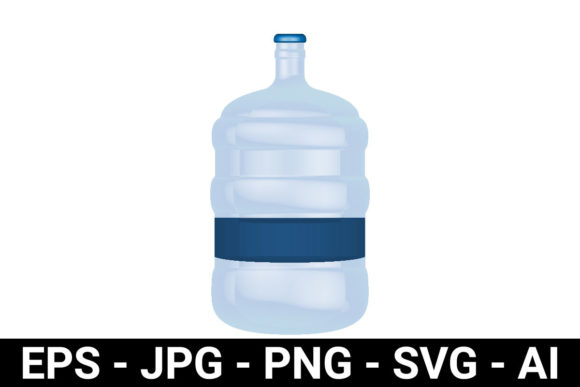
Also check the transparency of the plastic. Some gallon jugs are nearly clear, while others have a slight blue or matte tint. The mockup should reflect the type of gallon you are designing for. If you are branding a premium water product, a crystal-clear jug with subtle reflections works well. For a cleaning product, a slightly opaque or colored plastic may be more accurate. The closer the mockup matches your actual container, the more trustworthy your presentation becomes.
Using a Single Angle When Multiple Perspectives Are Needed
One common shortcut is relying on a single front-facing view of the gallon. While that may be enough for a quick social media post, it rarely suffices for client approvals, e-commerce listings, or packaging pitches. A good water gallon 3D mockup for packaging should offer multiple angles: front, three-quarter, side, and perhaps a top-down or cap detail view.
When you only show one angle, you miss the chance to demonstrate how the label wraps around the sides, how the cap matches the bottle design, and how the handle integrates with the overall look. Clients often want to see the product from different viewpoints before they sign off. If you only have one angle, you appear less prepared, and the client may ask for additional mockups, causing delays.
Better approach: Use a mockup set or customizable scene
Look for mockup files that include multiple perspectives in one package. Some PSD files have a control panel that lets you switch between views without leaving the document. Others come as separate files for each angle. Either way, having three to five angles ready will make your presentation feel complete and professional. If you are designing for e-commerce, you might only need a front and three-quarter view. For a packaging pitch, include a side view and a close-up of the cap and neck area.
If the mockup allows you to customize the background colour or add a shadow, take advantage of that. Small adjustments like matching the background to your brand colour or adding a soft drop shadow can elevate the entire presentation.
Not Considering the Cap, Neck, and Seal
It is easy to focus entirely on the body of the gallon and forget about the cap, neck ring, or tamper-evident seal. But these elements are part of the complete package. A water gallon 3D mockup for packaging that includes detailed cap options gives you a more accurate representation of your product. Some caps are sport-style with a pull-up spout, others are screw caps with ridges, and some are dispensing caps for cleaning products.
If your mockup has a generic cap that looks nothing like what you plan to use, your presentation will be misleading. A client or customer might imagine the product looking one way, only to find a completely different cap on the shelf. This disconnect can undermine trust in your brand or in your design skills.
How to handle cap and closure details
Whenever possible, choose a mockup that lets you change the cap colour or texture. Many premium mockups include separate layer groups for the cap, allowing you to apply a brand colour or even a logo. If your product uses a custom cap shape, you may need to find a more specific mockup or commission one. For most situations, a mockup that offers a few cap style options will be sufficient.
Also consider the neck area. Some gallon jugs have a neck ring or a label that wraps onto the neck. If your design includes a neck label, make sure the mockup shows that area clearly. If it doesn't, you may need to adjust your design or find a different mockup that accommodates it.
Downloading Low-Quality or Uneditable Files
The internet is full of free mockups, but not all are created equal. Many low-cost or free water gallon 3D mockup for packaging files suffer from poor resolution, limited editability, or sloppy layer organization. You may find that the smart object is rasterized, the shadows are baked into the layer, or the perspective is slightly off. These issues limit what you can do with the file and often lead to frustrating workarounds.
What to check before you download or buy
Before committing to a mockup, review the preview images carefully. Look for jagged edges, unnatural reflections, or inconsistent lighting. Read the product description to confirm that the file is fully layered and that smart objects are intact. If the description says "smart object included" but the preview looks flat, proceed with caution. User reviews can be very helpful here. See what others say about the file's editability and realism.
If you are purchasing a mockup, consider it an investment in your presentation quality. A well-made mockup can be used for multiple projects and often pays for itself after a few uses. Free mockups can work, but they usually require more adjustments. Be prepared to spend a bit of time fixing lighting, shadows, or alignment issues with free files.
Neglecting the Practical Purpose of the Mockup
Finally, remember that a mockup is a tool for communication, not an end in itself. The goal is to show your design on a realistic container so that decisions can be made about colour, layout, typography, and branding. If you spend too much time tweaking the mockup scene or obsessing over minor reflections, you lose sight of the design itself.
Keep your workflow efficient. Choose a water gallon 3D mockup for packaging that is close to your final container shape, adjust your label within the smart object, check a few angles, and move on. Your clients or stakeholders will appreciate a clear, realistic preview that helps them say yes faster.
By avoiding these common mistakes, you will produce mockups that look professional, communicate your design intent clearly, and save you from costly revisions down the line. Invest a little time upfront in choosing the right mockup and setting it up correctly, and your packaging presentations will stand out for all the right reasons.