Exploring the Dimension of Design: How Cube Pattern SVG Transforms Visual Communication with 3D Cube Patterns
In the ever-evolving landscape of digital design, few geometric motifs have proven as versatile and visually compelling as the cube pattern SVG. This structured arrangement of three-dimensional cubes, rendered through scalable vector graphics, has moved far beyond simple decorative use. Today, the 3D cube pattern serves as a foundational element in user interface design, data visualization, branding, and even educational modeling. Understanding how to create, manipulate, and apply these patterns effectively requires a blend of technical skill and aesthetic sensibility. This article unpacks the mechanics, creative potential, and practical considerations surrounding cube pattern SVG assets, offering insights for anyone from seasoned developers to curious hobbyists.
The Technical Backbone: Why SVG Excels for 3D Cube Patterns
Scalable Vector Graphics offer distinct advantages when constructing a 3D cube pattern. Unlike raster images, SVG files define shapes mathematically, which means a cube pattern SVG remains crisp and sharp at any resolution. This scalability is critical for responsive web design, where a pattern must adapt seamlessly from a smartphone screen to a 4K monitor. Furthermore, SVGs are inherently lightweight. A single cube pattern SVG file containing dozens of interconnected cubes can be smaller in file size than a compressed JPEG of the same visual complexity. This efficiency directly impacts page load times and server bandwidth, making it an attractive choice for performance-conscious developers.
Another technical advantage lies in editability. Because SVG code is plain text, designers can tweak individual cube faces, adjust lighting angles, or modify color gradients without redrawing the entire composition. For instance, altering the perspective of a 3D cube pattern might involve changing the d attribute of a path element or adjusting the transformation matrix. This programmatic control opens the door to dynamic, data-driven patterns that react to user interaction or real-time inputs. Educators and researchers often leverage this flexibility to create interactive mathematical models where each cube represents a variable or data point.
Rendering Isometric Cubes in SVG: A Practical Overview
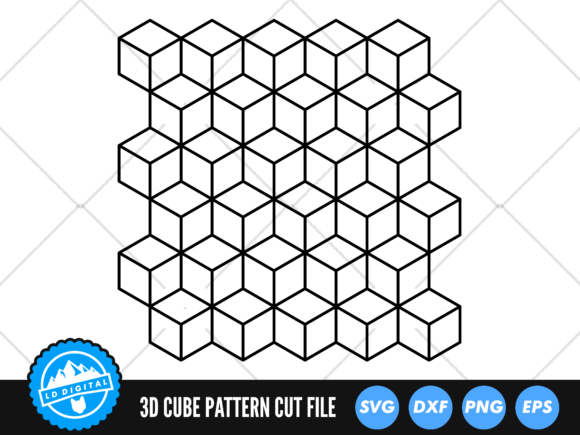
Creating a convincing cube pattern SVG typically relies on isometric projection. In an isometric grid, all three visible faces of a cube are drawn with equal angles, usually 30 degrees from the horizontal axis. To construct a single cube, you define three polygons: the top face, the left face, and the right face. Each polygon is filled with a distinct shade to simulate lighting. For a 3D cube pattern, these individual cubes are then repeated across the canvas using precise coordinate offsets. The repetition can be staggered to create a honeycomb-like effect or aligned in strict rows for a more orderly appearance. Many designers use SVG grouping ( tags to clone a master cube definition, which reduces code bloat and simplifies global style changes.
One common pitfall when generating a cube pattern SVG manually is maintaining consistent face shading across the entire pattern. Uneven gradients or mismatched light sources can break the illusion of depth. To avoid this, establish a single light direction before coding any paths. For example, if the light source is positioned from the top left, the top faces should be the lightest, the left faces medium, and the right faces the darkest. Applying this rule uniformly ensures that the 3D cube pattern reads as a cohesive volume rather than a disjointed collection of shapes.
Beyond Decoration: Real-World Applications of 3D Cube Patterns
The use of cube pattern SVG extends far beyond mere ornamentation. In modern web design, these patterns create visual texture without overwhelming content. A subtle 3D cube pattern layered behind a hero section can add depth and professionalism, guiding the user's eye toward key action elements. Brands in technology, architecture, and gaming frequently adopt cube motifs to communicate innovation, structure, and precision. For instance, a SaaS dashboard might incorporate a faint cube pattern SVG in its background to evoke a sense of organized data architecture.
Data Visualization and Infographics
Researchers and data journalists have discovered the power of 3D cube patterns for representing multi-dimensional datasets. Each cube in a pattern can encode a variable: height for magnitude, color for category, and position for time or sequence. By arranging these cubes programmatically, an SVG-based visualization can show complex relationships in an intuitive, spatial format. Unlike flat bar charts, a cube pattern SVG visualization invites exploration and comparison across axes. This approach is especially effective in educational contexts, where students can grasp volumetric relationships more readily than abstract numerical tables.
User Interface Elements and Microinteractions
UI designers have embraced the 3D cube pattern as a source of microinteractions and hover effects. A button that transforms into a rotating cube on hover, or a loading spinner composed of flipping cube faces, adds tactile feedback to digital experiences. These interactions rely on CSS animations or JavaScript manipulating the SVG's transform attributes. Because the cube pattern SVG is resolution-independent, these animated elements maintain smooth performance across devices. Moreover, the geometric rigidity of cubes lends itself well to the grid-based layouts common in material design and responsive frameworks.
Creative and Aesthetic Considerations
Not all cube pattern SVG implementations succeed aesthetically. The visual impact depends heavily on color harmony, scale, and repetition frequency. A pattern with cubes that are too large may dominate the screen, while cubes that are too small can create visual noise or moiré effects. Finding the right balance often requires iterative testing. One effective strategy is to use a 3D cube pattern as an accent rather than a full-screen backdrop. For example, confining the pattern to a sidebar, a footer, or a card component allows the geometry to enhance without competing with primary content.
Color and Gradient Strategies
Monochromatic cube pattern SVG designs tend to appear sophisticated and professional, especially in corporate contexts. Using three shades of a single hue for the cube faces creates a clean, modern look. Alternatively, a duotone approach—where two complementary colors alternate across the pattern—can inject energy and playfulness. Gradient fills on cube faces add another layer of realism, mimicking how light falls across a glossy surface. However, excessive gradients can increase file complexity and degrade rendering performance on low-end devices. For most applications, flat fills with carefully chosen hex values yield the best ratio of visual quality to computational cost.
Pattern Density and Viewer Perception
The density of a 3D cube pattern influences how viewers perceive the overall design. Sparse patterns with generous negative space feel open, airy, and modern, making them suitable for minimalist brands. Dense, tightly packed cube pattern SVG arrangements convey complexity, richness, and technological depth. Some designers intentionally break the pattern by leaving random cubes empty or replacing them with different shapes, creating a sense of motion or disruption. This technique can draw attention to specific areas of a page, such as a call-to-action button or a product highlight.
Optimizing Cube Pattern SVG for Performance and Accessibility
While SVG is inherently efficient, complex 3D cube patterns with hundreds or thousands of individual paths can become heavy. Several optimization techniques help maintain fast load times. First, use SVG symbols to define a single cube and reference it repeatedly with . This reduces code redundancy and browser parsing time. Second, simplify the paths: remove unnecessary decimal precision in coordinates, merge adjacent faces where possible, and avoid embedding extraneous metadata. Tools like SVGO can automate much of this cleanup. Third, consider using CSS background-image with an SVG pattern tile for repeating backgrounds, which offloads rendering to the browser's rasterizer.
Accessibility is another important dimension. A decorative cube pattern SVG should be hidden from screen readers using aria-hidden="true" to prevent cognitive overload. If the pattern conveys information—such as in a data visualization—provide equivalent text descriptions or data tables. Additionally, ensure that color contrasts within the 3D cube pattern meet WCAG guidelines, especially if the pattern appears behind text. High-contrast face shades help maintain legibility while preserving the three-dimensional effect.
Tooling and Workflow for Generating 3D Cube Patterns
Creating a cube pattern SVG manually in a code editor is feasible for simple grids, but most professionals rely on dedicated tools. Vector design applications like Adobe Illustrator, Figma, and Inkscape offer isometric grid plugins or built-in 3D extrusion features. A designer can draw a cube, apply colors, and then use pattern tiling or manual duplication to build the grid. For developers who prefer programmatic generation, libraries such as D3.js or custom JavaScript functions can produce 3D cube patterns dynamically. These scripts calculate cube positions based on input parameters like row count, cube size, and spacing, then output SVG markup directly into the DOM.
For those who need quick results, numerous online generators produce cube pattern SVG code with customizable colors, rotations, and densities. While convenient, these generators often produce bloated code with redundant definitions. It is advisable to clean the output with an optimizer before deploying to production. Hobbyists and educators may also find that building a simple 3D cube pattern from scratch in a text editor is a rewarding way to understand SVG coordinate systems and transformation logic.
Common Challenges and How to Solve Them
Even experienced designers encounter hurdles when working with cube pattern SVG. One frequent issue is misalignment between adjacent cubes, which destroys the illusion of a continuous surface. This usually stems from rounding errors in coordinate calculations. To fix it, ensure that all cube dimensions are multiples of a base unit, and double-check the offset values for each row and column. Another challenge is maintaining consistent lighting across a large pattern when using gradient fills. A gradient applied to an individual cube may not align with the gradients of neighboring cubes, causing visual seams. The solution is to apply a global gradient across the entire pattern or use flat colors with consistent luminance.
Performance degradation is another concern, particularly on mobile devices. A 3D cube pattern with hundreds of animated elements can cause choppy scrolling or high battery drain. To mitigate this, limit the number of animated cubes, use hardware-accelerated CSS properties for transforms and opacity, and consider using will-change hints sparingly. If the pattern is purely decorative, rasterizing a portion of it as a PNG fallback for low-power devices can improve the user experience without sacrificing visual quality.
Future Trends: Where Cube Pattern SVG Is Heading
The role of cube pattern SVG in digital design continues to evolve. One emerging trend is the integration of 3D cube patterns with WebGL and Three.js, where SVG serves as a fallback or a texture source for immersive 3D environments. Designers are also exploring generative art approaches, using algorithms to create unique 3D cube patterns that shift based on user behavior, time of day, or external data feeds. This fusion of deterministic geometry with dynamic input produces experiences that feel alive and personalized.
Another development is the use of cube pattern SVG in augmented reality interfaces, where real-world surfaces are overlaid with digital cube grids for spatial mapping. As browsers and devices gain more advanced AR capabilities, lightweight SVG patterns offer a practical way to render persistent, scalable overlays. For business owners and educators, this opens new avenues for interactive product demonstrations, architectural walkthroughs, and immersive learning modules that are accessible without specialized hardware.
As the design community continues to push the boundaries of what SVG can achieve, the humble 3D cube pattern remains a powerful testament to the elegance of geometric simplicity. Whether used as a subtle texture, a dynamic data visualization, or a core branding element, its versatility ensures that it will remain a staple in the designer's toolkit for years to come.