Create Stunning 4th of July 3D Editable Text Effects That Pop
When Independence Day rolls around, everyone looks for new ways to show their patriotic spirit. Whether you are designing a social media post, a flyer for a community event, or a personalized greeting, the words you choose matter just as much as the images. That is where 4th of July 3D editable text effects come into play. These are pre-made digital styles that let you type any message and instantly give it a three-dimensional, celebratory look. Instead of spending hours learning complex 3D modeling software, you can simply open a file, edit the text, and save a professional-grade design in minutes.
What Are 4th of July 3D Editable Text Effects?
A 3D editable text effect is essentially a layered graphic template. It usually comes in the form of a Photoshop PSD file or a Figma component that includes multiple layers, shadows, gradients, and highlights. The "editable" part means you can double-click the text layer and replace the placeholder words with your own message. The effect automatically adjusts to match the new text.
For the 4th of July, these effects typically feature:
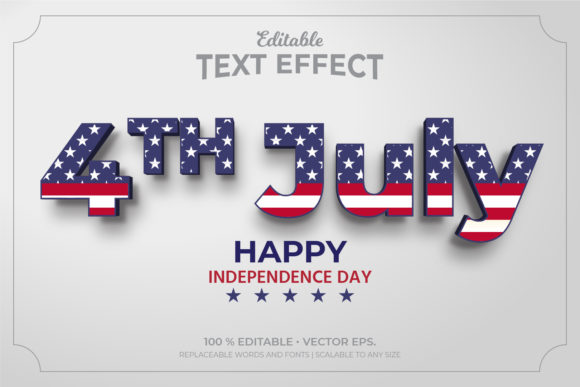
- Red, white, and blue color schemes with gradients that mimic fireworks or star-spangled patterns.
- Bevel and emboss styles that give letters depth, making them look chiseled from marble or carved from wood.
- Glow and sparkle overlays that simulate fireworks reflections.
- Star and stripe textures embedded directly into the letter surfaces.
- Drop shadows and cast shadows that separate the text from the background.
These effects are not just for professional graphic designers. Beginners, small business owners, teachers, and hobbyists can all use them to create eye-catching visuals without needing to master advanced design skills.
Why Use 3D Editable Text Effects for Independence Day?
The Fourth of July is a visual holiday. From fireworks to parades, everything is designed to capture attention. Flat, plain text simply does not convey the same energy and celebration. A 3D effect adds a sense of depth, importance, and festivity to your words. When someone sees a title like "Happy 4th of July" jumping off the page, they immediately feel the excitement of the holiday.
There are several key reasons these effects are so popular:
1. Speed and Efficiency
Designing a custom 3D text effect from scratch can take hours. You would need to create multiple layers, adjust lighting, apply textures, and fine-tune shadows. With an editable template, you can skip all that work. Simply open the file, edit the text, and you are done. This is especially valuable for last-minute projects or when you need to produce multiple versions for different platforms.
2. Consistency Across Materials
If you are promoting a 4th of July event, you might need a banner for your website, a flyer for print, a post for Instagram, and a cover photo for Facebook. Using the same 3D text effect across all these materials creates a cohesive brand look. The consistent style helps your audience recognize your message instantly.
3. Accessible Professional Quality
Not everyone has the budget to hire a professional designer. Editable text effects level the playing field. A well-designed template can look just as polished as a custom design. The bevels, highlights, and textures are already optimized for visual impact, so your final product looks like it came from a studio.
4. Creative Freedom Without Technical Barriers
You can change the words, adjust the font size, and sometimes even swap colors or background elements. This gives you creative control over the final look while the technical heavy lifting is already done. Want to write "Land of the Free" instead of "Happy 4th of July"? No problem. The effect adapts to whatever text you type.
Practical Applications in Modern Life
These text effects are not limited to professional designers. They have found a place in many everyday scenarios:
- Social Media Content: Instagram stories, Facebook posts, TikTok thumbnails, and YouTube banners all benefit from bold, patriotic typography. A 3D text effect can make your post stand out in a crowded feed.
- Small Business Promotions: Local shops, restaurants, and service providers use these effects to create flyers, window signs, and email headers promoting their 4th of July sales or events.
- Educational Materials: Teachers design classroom decorations, bulletin boards, and worksheets with festive text. A 3D effect can make a history lesson about the Declaration of Independence more engaging for students.
- Personal Projects: Families create custom invitations for backyard barbecues, photo overlays for holiday memories, or even t-shirt designs using these templates.
- Nonprofit and Community Groups: Organizations promoting parades, fireworks shows, or charity runs use the effects to produce posters and digital ads that attract attention.
How to Choose the Right 3D Editable Text Effect
Not all templates are created equal. When selecting a 4th of July 3D text effect, consider these factors:
- File Format Compatibility: Make sure the file works with your software. Most editable text effects come as PSD files for Adobe Photoshop, but you can also find versions for Illustrator, Affinity, Canva, and Figma.
- Ease of Editing: Look for templates that clearly label the text layer. Some include a simple instruction file. If you are a beginner, choose one with a straightforward "double-click to edit" workflow.
- Color Customization: Some effects allow you to change the fill colors, while others have fixed gradients. If you need a specific shade of red or blue, check whether the template supports color adjustments.
- Resolution and Scaling: For print projects, ensure the template is at least 300 DPI. For digital use, a high-resolution file that scales well is important.
- Additional Elements: Many templates include bonus graphics like stars, sparkles, banners, or backgrounds. These extras can save you even more time.
Common Misunderstandings About 3D Text Effects
Some people assume that using a pre-made effect is "cheating" or that the results will look generic. Let me clarify a few points:
Myth 1: "They all look the same."
While some templates are similar, high-quality designers offer unique styles. You can find effects that mimic metallic engraving, neon lighting, shiny plastic, vintage wood carving, or even cracked stone. The variety is huge, so you can pick a look that matches your specific vision.
Myth 2: "You need to be an expert to edit them."
Most templates are designed for beginners. The layers are clearly named, and the editing process is often as simple as typing new text. Many include video tutorials or written guides. If you can use basic word processing software, you can edit these templates.
Myth 3: "They only work in Photoshop."
That used to be true, but now you can find editable text effects for many platforms. Canva has a huge library of 3D text styles. Figma and Affinity also support layered templates. Even some online editors let you apply 3D effects without any software installation.
Myth 4: "The text will look distorted with longer words."
Well-designed templates use smart object layers that adjust the effect to fit your text. As long as you stay within the recommended font size range, the 3D effect scales properly. You can also adjust the layer styles if needed.
Building a Broader Understanding of 3D Text Effects
At its core, a 3D text effect simulates depth on a flat screen. It does this by using light, shadow, and texture. When you look at a word with a bevel effect, your brain interprets the highlights and shadows as physical edges. This is the same principle used in 3D modeling, but applied only to typography.
The technology behind these effects has evolved significantly. In the early days of digital design, creating a 3D text effect required manual layering and extensive knowledge of Photoshop's layer styles. Today, AI-assisted tools and smart object automation make the process far more accessible. You can now find templates that adjust lighting angles, reflection intensity, and even texture mapping automatically.
For the 4th of July, the patriotic theme adds emotional resonance to the technical effect. The colors red, white, and blue have deep symbolic meaning. When you present them in a 3D format, the message feels more substantial and memorable. It is no longer just text on a screen. It becomes a visual experience that aligns with the celebratory nature of the holiday.
Tips for Getting the Most Out of Your Text Effect
Here are practical pointers to ensure your project looks its best:
- Choose the right background. A dark blue or starry night background makes red and white 3D text pop. Avoid busy backgrounds that compete with the text.
- Keep your message short. These effects work best with headlines or short phrases. Two to five words is ideal. Long paragraphs lose the dramatic impact.
- Use complementary fonts. Most templates come with a specific font embedded. If you change the font, make sure it has a similar weight and style. Sans-serif fonts with thick strokes often work best.
- Test on different devices. What looks great on your computer monitor might look different on a phone screen. Check your design on multiple devices before publishing.
- Save a backup. Always keep the original template file untouched. If you need to make changes later, you can start fresh from the original.
Where to Find Quality 4th of July 3D Editable Text Effects
Many online marketplaces offer these templates. Sites like Creative Market, Envato Elements, GraphicRiver, and Design Cuts have extensive collections. You can also find free options on platforms like Freepik and Pixabay, though the editing flexibility may be limited. When downloading, always check the license terms. Some templates are for personal use only, while others include commercial rights for business projects.
The Future of Editable Text Effects
As design tools become more powerful and accessible, we will see even more sophisticated text effects. Real-time 3D rendering in web browsers, AI-generated textures, and interactive typography that responds to mouse movements are already emerging. For now, 4th of July 3D editable text effects offer a perfect balance of quality, speed, and ease of use. They allow anyone to create professional, patriotic designs that capture the spirit of Independence Day.
Whether you are a seasoned designer or someone who just wants to make a cool Facebook post, these effects give you the power to communicate with impact. The next time you need to celebrate America's birthday, let your words stand tall in three dimensions. Your audience will notice the difference.