Business Card 3D Mockup Template Bundle for Real Branding Projects
You have designed a card that looks sharp on screen. But once it leaves your monitor and lands on a desk, everything changes. Light hits the paper at an angle. The corners catch shadows. The texture becomes visible. That gap between a flat file and a printed object matters more than most people realize. A Business Card 3D Mockup Template Bundle bridges that gap without forcing you to set up a photoshoot, rent a studio, or learn advanced rendering software. It gives you a way to show your work inside a realistic environment where people can actually picture it in their hands.
What the bundle actually does
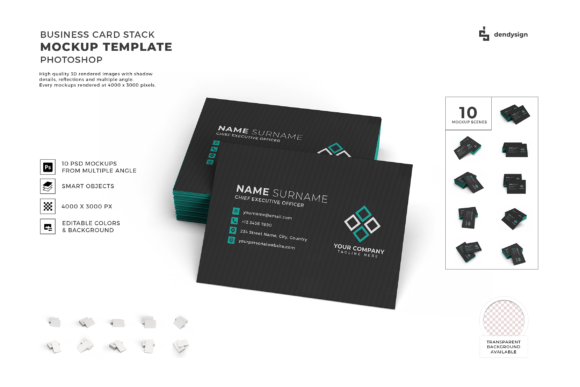
Instead of handing someone a flat PNG and asking them to imagine the rest, this bundle places your design onto pre-built 3D scenes. You drop your artwork into a smart layer inside Photoshop or a compatible editor, and the template handles the lighting, perspective, shadows, and reflections. The result looks like a photograph of a real printed card sitting on a surface, held by a hand, leaning against a notebook, or stacked with other cards. The bundle includes multiple scenes so you are not stuck with one look for every project.
That is the core mechanic. The real value comes from how you apply it to actual situations.
Presenting a concept to a client who needs to feel it
Freelance designers and agency creatives spend a lot of time explaining why a certain typeface works or why a particular shade of blue fits the brand. Words can only do so much. When you show a client a flat file, they often focus on things that will change in print anyway, like the exact screen color or the pixel alignment. When you show them the same design inside a 3D mockup, they start reacting to the card as an object. They notice the finish. They see how it sits against a surface. They imagine handing it to someone.
One designer I know used a mockup scene with a card resting on a marble countertop to pitch a luxury real estate brand. The client stopped asking about font sizes and started talking about paper stock. That shift happens because a 3D mockup sims the finished product instead of the production file. The Business Card 3D Mockup Template Bundle gives you several environments so you can match the scene to the brand personality. A sleek dark desk for a tech startup. A leather notebook for a consultant. A coffee shop table for a creative agency.
Building a portfolio that lands work
If you are a graphic designer or a branding specialist looking for new clients, your portfolio needs to show finished work, not drafts. But many designers do not have the budget to print every project they feature, especially speculative work or student projects. Mockups solve that problem. You can take a concept you created for a fictional brand or a past client and present it as if it went through the entire production process.
Think about how much stronger a portfolio page looks when each project includes a realistic photo of the card in use rather than a flat vector file. The viewer sees the scale, the texture, and the context. They get a better sense of your taste and your attention to detail. A bundle with multiple angles and settings lets you show the same card from different perspectives within the same project, which makes the presentation feel thorough and professional.
Launching your own brand or side project
Entrepreneurs, small business owners, and side hustlers often skip business cards because they feel like an extra expense before the brand is established. But when you do need to hand one out at a networking event, a conference, or a local meetup, having a cheap home-printed card feels disappointing. A 3D mockup lets you design your card, preview it realistically, and then decide whether you want to order prints or keep refining the look.
Many people in this situation end up using the mockup itself as a marketing asset. They post the rendered card on social media, include it in their email signature, or add it to their landing page. The mockup becomes a placeholder until they commit to a print run. That is a low-risk way to test how the card feels in a visual context without spending money on printing mistakes.
Social media content that stops the scroll
Marketers, bloggers, and content creators know that flat images get ignored on platforms like Instagram, Pinterest, and LinkedIn. A product shot with depth, lighting, and texture grabs attention longer. If you are promoting a design service, a branding package, or even a digital product like a template set, showing a mockup of a business card adds credibility.
A common approach is to create a carousel post where each slide shows the same card in a different scene. The first slide features the card held between fingers. The second shows it next to a laptop and a cup of coffee. The third displays a stack of cards with the top one slightly angled. This kind of sequence tells a story about the item being real and usable. The Business Card 3D Mockup Template Bundle supports that strategy because it includes varied compositions within a single pack, so you are not repeating the same background over and over.
Educational materials and tutorials
Educators, course creators, and YouTube instructors who teach graphic design or branding often need visual aids that show the difference between good and bad card layouts. Instead of explaining in abstract terms why a design works, you can place two versions of the same card into the same mockup scene and compare them side by side. Students see the practical effect of typography choices, color contrast, and spacing much faster when they view the designs in a realistic setting.
If you run a tutorial on how to set up a business card file for print, the mockup serves as the final step. You walk through the technical specifications, and then you drop the finished design into the scene so viewers see what they are working toward. That makes the lesson feel complete and gives students a clear reward for following along.
Print shops and stationery sellers
If you run a small print business or sell stationery products online, you need to show customers what their order could look like without printing a sample for every inquiry. A 3D mockup template becomes a preview tool. You let clients upload their design or choose from your templates, and you send back a mockup image that shows how the card will appear in real life. This reduces back-and-forth communication and cuts down on reprints caused by unrealistic expectations.
The bundle is also useful for your own product listings. Instead of photographing every card you sell, you can generate mockups for different color variations or custom options. That keeps your store consistent and saves time on photoshoots.
Things to consider before choosing a bundle
Not every mockup template works the same way, so it helps to check a few details before downloading. First, verify which software the templates support. Most use Photoshop smart layers, but some work with Affinity Photo, Canva, or even web-based editors. If you do not own Photoshop, look for a bundle that offers alternatives.
Second, check the resolution and output size. If you need mockups for a large format presentation or a print catalog, low-resolution scenes will look pixelated. The bundle should offer high-resolution renders at 300 DPI or close to it.
Third, look at the variety of scenes. A bundle with ten different angles and environments gives you more flexibility than one with three similar shots. Consider where you plan to use the images and whether the available scenes match your typical brand aesthetics. A dark, moody scene might not suit a cheerful children's brand, and a bright minimalist desk might not fit a luxury law firm.
Fourth, think about customization. Some templates allow you to adjust the lighting, background color, or card finish. Others lock those elements in place. If you want to match the mockup to your specific brand colors or mood, choose a bundle that gives you some control over the scene.
How different users get different value
A freelancer might use the bundle to win a single client and then reuse the same mockups for every future project. A marketer might use it to create a month of social media content in one afternoon. A small business owner might use it to test three different card designs before placing a print order. A teacher might use it to build a more engaging lesson plan. The same set of files serves completely different purposes depending on who opens them.
That is the reason bundles like this one tend to hold value over time. You are not buying a one-use asset. You are buying a tool that adapts to whatever project lands on your desk next. The more scenarios you encounter, the more you appreciate having a library of scenes ready to go.
Realistic expectations about mockups and printing
It is worth noting that a 3D mockup approximates reality but does not replace a printed proof. The lighting in the scene may make colors look slightly different from how they appear on actual paper. The simulated texture cannot replicate every coating or embossed detail. Use mockups to present concepts, build marketing materials, and test visual balance. When it is time to send the file to a printer, always request a physical proof if the job is important.
That said, for the vast majority of situations where you just need someone to see what the card could look like, a well-made 3D mockup does the job faster and cheaper than any alternative.
Making the most of the bundle once you have it
Take a few minutes to organize the templates by scene type or lighting style so you can find the right one quickly later. Create a folder structure that makes sense for your workflow. If you work with multiple clients, consider saving a master file for each template with your logo or brand colors already placed so you do not have to rebuild from scratch every time.
Experiment with each scene before you need it. Open the templates, drop in a test design, and see how the light hits the surface. Learn which scenes make your work look strongest. That preparation saves you stress when a deadline is tight and you need a polished mockup in ten minutes.
The Business Card 3D Mockup Template Bundle is not a flashy gimmick. It is a straightforward tool that solves a practical problem: showing people what a printed card will actually look like before it exists. Whether you are a designer selling a concept, a business owner testing a brand, or a creator building a portfolio, having realistic visuals ready to go makes your work easier and your presentation stronger.